
• Dịch vụ Quản trị máy chủ
  • Liên hệ quảng cáo
Thứ Tư, Tháng 2 4, 2026
  • Login
cPanel.vn
Liên hệ quảng cáo
  • Home
  • Control Panel
    • cPanel/WHM
    • Direct Admin
    • HELM
    • Hosting Controller
    • IspConfig
    • Kloxo-LxAdmin
    • LNMP
    • Plesk
    • Webmin
  • Domain – Hosting
    • Hosting
    • Tên miền
  • Ảo hóa
    • Virtuozzo
    • VMWare
  • Hệ điều hành
    • Linux
    • Windows
  • Internet
    • Thế giới AI
    • Thủ thuật SEO
    • Nhiếp ảnh
  • Server
    • VPS
    • Web Server
    • Email Server
    • Database Server
      • MSSQL
      • MySQL
  • WordPress
    • Themes
No Result
View All Result
  • Home
  • Control Panel
    • cPanel/WHM
    • Direct Admin
    • HELM
    • Hosting Controller
    • IspConfig
    • Kloxo-LxAdmin
    • LNMP
    • Plesk
    • Webmin
  • Domain – Hosting
    • Hosting
    • Tên miền
  • Ảo hóa
    • Virtuozzo
    • VMWare
  • Hệ điều hành
    • Linux
    • Windows
  • Internet
    • Thế giới AI
    • Thủ thuật SEO
    • Nhiếp ảnh
  • Server
    • VPS
    • Web Server
    • Email Server
    • Database Server
      • MSSQL
      • MySQL
  • WordPress
    • Themes
No Result
View All Result
cPanel.vn
No Result
View All Result
Home Control Panel Direct Admin

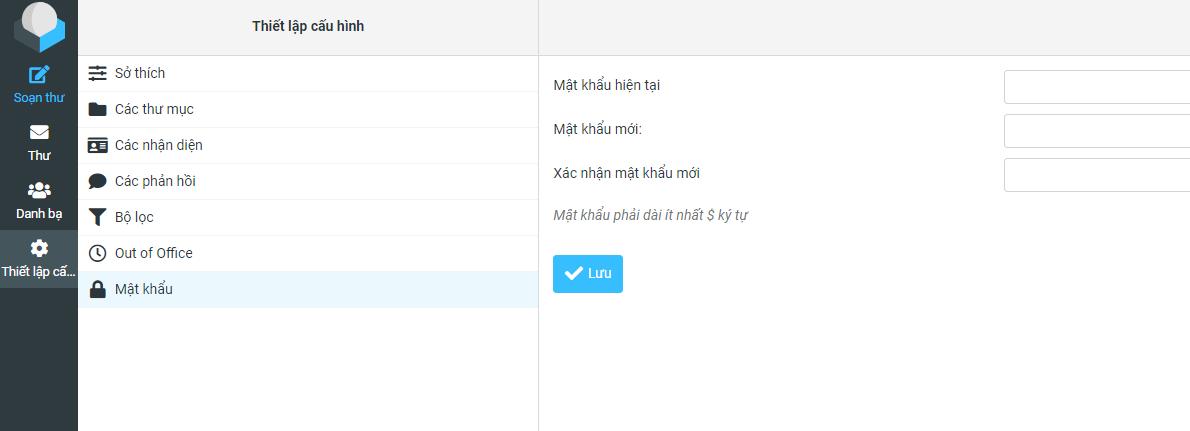
Khắc phục lỗi “DA appears to be using SSL. Change your script to connect to ssl” khi đổi mật khẩu Round Cube trên DirectAdmin

cPanel.vn by cPanel.vn
08/10/2025
in Control Panel, Direct Admin
Reading Time: 1 min read

Khắc phục lỗi “DA appears to be using SSL. Change your script to connect to ssl” khi đổi mật khẩu Round Cube trên DirectAdmin

Follow theo link: https://forum.directadmin.com/threads/roundcube-password-change-error-da-appears-to-be-using-ssl-change-your-script-to-connect-to-ssl.61439/

Today I ran also in this problem and email_ftp_password_change=1 was already in the directadmin.conf file. I solved it by changing the Roundcube configuration file /var/www/html/roundcube/plugins/password/config.inc.php:

Change this line:

$config[‘password_directadmin_host’] = ‘tcp://localhost’;

to

$config[‘password_directadmin_host’] = ‘ssl://localhost’;

in the DirectAdmin driver options. This solved it for me. I just have to keep an eye to it that the next update doesn’t overwrite this change.

I just mention this here for if somebody also encounters this issue.
Previous Post

Cấu hình Laravel trên DirectAdmin

Next Post

Dịch tiếng trong video Youtube tự động với công cụ AI Youtube Dubbing

Có thể bạn quan tâm

Cấu hình Laravel trên DirectAdmin
Control Panel

Cấu hình Laravel trên DirectAdmin

03/11/2024
Khắc phục lỗi “Error: PHP 5.3+ is required” trên Kloxo-Mr
Kloxo-LxAdmin

Khắc phục lỗi “Error: PHP 5.3+ is required” trên Kloxo-Mr

02/07/2014
Bắt buộc đăng nhập DirectAdmin qua SSL
Direct Admin

Bắt buộc đăng nhập DirectAdmin qua SSL

08/06/2014
CSF - Firewall miễn phí trên Linux
cPanel/WHM

Cài đặt firewall CSF trên DirectAdmin và cPanel

08/06/2014
Next Post
Dịch tiếng trong video Youtube tự động với công cụ AI Youtube Dubbing

Dịch tiếng trong video Youtube tự động với công cụ AI Youtube Dubbing

Nên xem.

Bắt buộc đăng nhập DirectAdmin qua SSL

Bắt buộc đăng nhập DirectAdmin qua SSL

08/06/2014
Khắc phục lỗi Internal Server Error khi chạy suPHP trên Kloxo

Khắc phục lỗi Internal Server Error khi chạy suPHP trên Kloxo

20/03/2012
Liên hệ quảng cáo Liên hệ quảng cáo Liên hệ quảng cáo

Đang HOT.

Khắc phục lỗi “The system administrator has set policies to prevent this installation” trên VMWare Server

Khắc phục lỗi “The system administrator has set policies to prevent this installation” trên VMWare Server

20/07/2011
20/11 tràn ngập niềm vui cùng cô trò VTC Academy

20/11 tràn ngập niềm vui cùng cô trò VTC Academy

23/11/2012
Cảnh báo công ty Việt Tiến Mạnh (VTM Group) lừa đảo

Cảnh báo công ty Việt Tiến Mạnh (VTM Group) lừa đảo

03/11/2024
Dịch tiếng trong video Youtube tự động với công cụ AI Youtube Dubbing

Dịch tiếng trong video Youtube tự động với công cụ AI Youtube Dubbing

08/10/2025
Cài đặt VMware Tools cho máy ảo CentOS 5 trên VMware Workstation

Cài đặt VMware Tools cho máy ảo CentOS 5 trên VMware Workstation

20/07/2011
cPanel.vn

cPanel.vn

Chia sẻ kiến thức và kinh nghiệm quản trị máy chủ, tên miền, email, hosting cũng như các thủ thuật máy tính, công nghệ thông tin.

Liên hệ quảng cáo: haomd@cpanel.vn

Follow Us

Danh mục

  • Control Panel
  • cPanel/WHM
  • Direct Admin
  • Domain/Host/Server
  • Email Server
  • HELM
  • Hosting
  • Internet
  • Kloxo-LxAdmin
  • Linux
  • LNMP
  • MSSQL
  • MySQL
  • Nhiếp ảnh
  • Plesk
  • Tên miền
  • Thế giới AI
  • Themes
  • Thủ thuật SEO
  • Virtuozzo
  • VMWare
  • VPS
  • Web Server
  • Windows
  • Wordpress

Thẻ

123system 123systems backup ca si ngan khanh CentOS cpanel CSF directadmin facebook google google apps google music beta green value host greenvaluehost hack tên miền how to install kenh14 kenh14.vn khuyến mãi kloxo kênh 14 kênh 14 bị hack like fanpage linux lnmp mime type mysql ngân khánh outlook phpmyadmin tên miền tên miền miễn phí vietidc vmware vmware server VPS vps giá rẻ vps miễn phí vtc vtca vtc academy windows windows xp đăng ký tên miền ưu đãi
  • Giới thiệu
  • Quảng cáo
  • Dịch vụ

© 2008 - 2024 cPanel.vn - Powered by VietIDC and Raspberry Pi Việt Nam.

No Result
View All Result
  • Home
  • Control Panel
    • cPanel/WHM
    • Direct Admin
    • HELM
    • Hosting Controller
    • IspConfig
    • Kloxo-LxAdmin
    • LNMP
    • Plesk
    • Webmin
  • Domain – Hosting
    • Hosting
    • Tên miền
  • Ảo hóa
    • Virtuozzo
    • VMWare
  • Hệ điều hành
    • Linux
    • Windows
  • Internet
    • Thế giới AI
    • Thủ thuật SEO
    • Nhiếp ảnh
  • Server
    • VPS
    • Web Server
    • Email Server
    • Database Server
      • MSSQL
      • MySQL
  • WordPress
    • Themes

© 2008 - 2024 cPanel.vn - Powered by VietIDC and Raspberry Pi Việt Nam.

Welcome Back!

Login to your account below

Forgotten Password?

Retrieve your password

Please enter your username or email address to reset your password.

Log In