


• Dịch vụ Quản trị máy chủ
  • Liên hệ quảng cáo
Thứ Hai, Tháng 11 2, 2026
  • Login
cPanel.vn
AZDigi
  • Home
  • Control Panel
    • cPanel/WHM
    • Direct Admin
    • HELM
    • Hosting Controller
    • IspConfig
    • Kloxo-LxAdmin
    • LNMP
    • Plesk
    • Webmin
  • Domain – Hosting
    • Hosting
    • Tên miền
  • Ảo hóa
    • Virtuozzo
    • VMWare
  • Hệ điều hành
    • Linux
    • Windows
  • Internet
    • Thế giới AI
    • Thủ thuật SEO
    • Nhiếp ảnh
  • Server
    • VPS
    • Web Server
    • Email Server
    • Database Server
      • MSSQL
      • MySQL
  • WordPress
    • Themes
No Result
View All Result
cPanel.vn
No Result
View All Result
Home Hệ điều hành Linux

Cài đặt và cấu hình APF Firewall trên VPS Linux

cPanel.vn by cPanel.vn
14/05/2014
in Linux
Reading Time: 2 mins read

APF Firewall là một phần mềm Firewall Script phát triễn trên nền IPTables, tuy không thể sánh cùng với các đàn anh firewall khác nhưng bù lại được miễn phí và mức độ firewall cũng không đến nỗi tệ. Bài viết này hi vọng sẽ giúp được bạn nào dùng VPS ( không ít thì nhiều ) để security VPS của mình được tốt hơn.
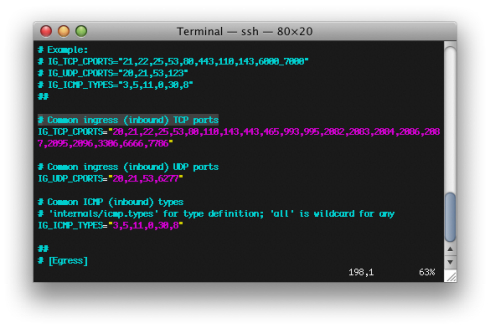
Cấu hình APF Firewall

1. Login SSH bằng tài khoản Root:

wget http://www.r-fx.ca/downloads/apf-current.tar.gz

tar -xzf apf-current.tar.gz

cd apf-version…

sh install.sh

Đến đây xem như là install xong APF. Chuyển sang bước 2..

2. Cấu hình APF:

2.1 Edit /etc/apf/conf.apf

Search: DEVM=”1″

Change it to: DEVM=”0″

TCP_CPORTS=”…..”   <— Bạn muốn Open Port nào thì gõ dzo Ex: 22,25,110,143,….

IG_UDP_CPORTS=””  <— Ex Port DNS: 53

(***)

2.2 Edit /etc/sysconfig/iptables-config

IPTABLES_MODULES=”ipt_REJECT ipt_tos ipt_TOS ipt_LOG ip_conntrack ipt_limit ipt_multiport iptable_filter iptable_mangle ipt_TCPMSS ipt_tcpmss ipt_ttl ipt_length ipt_REDIRECT ipt_state iptable_nat ip_nat_ftp”

2.3 Edit /etc/sysconfig/vz

IPTABLES=”ipt_REJECT
ipt_tos ipt_TOS ipt_LOG ip_conntrack ipt_limit ipt_multiport
iptable_filter iptable_mangle ipt_TCPMSS ipt_tcpmss ipt_ttl ipt_length
ipt_REDIRECT ipt_state iptable_nat ip_nat_ftp”

2.4 Khởi động lại vz service:

# service vz restart

2.5 Set parameter limits the amount of iptables rules

# vzctl set 101 –numiptent 400 –save

2.6 Edit /etc/apf/conf.apf

IFACE_IN=”venet0″
IFACE_OUT=”venet0″
SET_MONOKERN=”1″

2.7 Start APF

# /etc/init.d/apf start

Đến đây là xem như hoàn tất. Nếu bạn là người thích nghiên cứu thì tham khảo thêm phần này:
http://www.rfxnetworks.com/apf/README.antidos
Chúc thành công
(DigiPower)

Tags: APFAPF Firewallcài đặt apf firewallhow to install apf firewalllinuxVPS
Previous Post

Quản trị Windows Server 2003 từ máy trạm XP

Next Post

Check MySQL version

Có thể bạn quan tâm

Linux Command: Hiển thị phiên bản Linux
Linux

Linux Command: Hiển thị phiên bản Linux

23/05/2014
BURST.NET – Miễn phí VPS 1 tháng đầu
Internet

BURST.NET – Miễn phí VPS 1 tháng đầu

06/08/2011
Tự động backup database và sao lưu FTP trên VPS chạy LNMP
Linux

Tự động backup database và sao lưu FTP trên VPS chạy LNMP

08/08/2011
Nâng cấp PHP lên 5.2.x
Linux

Nâng cấp PHP lên 5.2.x

22/05/2024
Next Post

Check MySQL version

Nên xem.

Tự động backup database và sao lưu FTP trên VPS chạy LNMP

Tự động backup database và sao lưu FTP trên VPS chạy LNMP

08/08/2011
Ưu đãi đăng ký mới tên miền từ GoDaddy

GoDaddy – Đăng ký mới tên miền chỉ với $1.99

16/12/2012
Liên hệ quảng cáo Liên hệ quảng cáo Liên hệ quảng cáo

Đang HOT.

Dịch tiếng trong video Youtube tự động với công cụ AI Youtube Dubbing

Dịch tiếng trong video Youtube tự động với công cụ AI Youtube Dubbing

29/04/2026
Chỉ số Talking about this trên Fanpage của VTC Academy

Chỉ số TAT – Talking About This trên Facebook

12/04/2012
Đăng ký sử dụng hosting chỉ với 2.97$/tháng

Đăng ký sử dụng hosting chỉ với 2.97$/tháng

27/08/2011
Khắc phục lỗi không start được Gene6 FTP Service trên Windows 2008

Khắc phục lỗi không start được Gene6 FTP Service trên Windows 2008

10/12/2013
Khắc phục lỗi “The system administrator has set policies to prevent this installation” trên VMWare Server

Khắc phục lỗi “The system administrator has set policies to prevent this installation” trên VMWare Server

20/07/2011
cPanel.vn

cPanel.vn

Chia sẻ kiến thức và kinh nghiệm quản trị máy chủ, tên miền, email, hosting cũng như các thủ thuật máy tính, công nghệ thông tin.

Liên hệ quảng cáo: haomd@cpanel.vn

Follow Us

Danh mục

  • Control Panel
  • cPanel/WHM
  • Direct Admin
  • Domain/Host/Server
  • Email Server
  • HELM
  • Hosting
  • Internet
  • Kloxo-LxAdmin
  • Linux
  • LNMP
  • MSSQL
  • MySQL
  • Nhiếp ảnh
  • Plesk
  • Tên miền
  • Thế giới AI
  • Themes
  • Thủ thuật SEO
  • Virtuozzo
  • VMWare
  • VPS
  • Web Server
  • Windows
  • Wordpress

Thẻ

123system 123systems ca si ngan khanh CentOS command cpanel CSF database server directadmin esxi facebook flv ftp ftp server google google apps IIS kenh14 khuyến mãi kloxo kênh 14 kênh 14 bị hack like fanpage linux lnmp mime type mssql mssql 2005 mysql phpmyadmin tên miền tên miền miễn phí vietidc vmware vmware server VPS vps giá rẻ vps miễn phí vtc vtca vtc academy windows Windows 2003 windows xp đăng ký tên miền
  • Giới thiệu
  • Quảng cáo
  • Dịch vụ

© 2008 - 2024 cPanel.vn - Powered by VietIDC and Raspberry Pi Việt Nam.

No Result
View All Result
  • Home
  • Control Panel
    • cPanel/WHM
    • Direct Admin
    • HELM
    • Hosting Controller
    • IspConfig
    • Kloxo-LxAdmin
    • LNMP
    • Plesk
    • Webmin
  • Domain – Hosting
    • Hosting
    • Tên miền
  • Ảo hóa
    • Virtuozzo
    • VMWare
  • Hệ điều hành
    • Linux
    • Windows
  • Internet
    • Thế giới AI
    • Thủ thuật SEO
    • Nhiếp ảnh
  • Server
    • VPS
    • Web Server
    • Email Server
    • Database Server
      • MSSQL
      • MySQL
  • WordPress
    • Themes

© 2008 - 2024 cPanel.vn - Powered by VietIDC and Raspberry Pi Việt Nam.

Welcome Back!

Login to your account below

Forgotten Password?

Retrieve your password

Please enter your username or email address to reset your password.

Log In